


Every business owner reaches a moment when they need a website. And in 2026, that moment comes with a very modern dilemma: “AI website builders vs WordPress: what to choose?”
The question seems too simple while reading, but when you think deeply about it, new sub-questions start to arise, like will AI builders not need a developer, will WordPress deliver the site on time, etc.?
Here are a few numbers that frame the debate well. WordPress currently powers 42.6% of all websites on the internet, according to W3Techs data from early 2026. At the same time, the AI website builder market was valued at $5 billion in 2025 and is growing at over 26% annually. Both sides are thriving, which means the choice is genuinely worth thinking through.
Choosing the wrong platform can cost you time, money, and scalability down the road. So, this guide breaks down the AI website builder vs WordPress comparison honestly for you to make a decision based on your actual business goals.
What Are AI Website Builders? (And What WordPress Actually Is)
Before comparing the two, it helps to understand what you are actually choosing between. And here is where most comparisons go wrong.
AI website builders are tools that use Machine Learning (ML) and generative AI to create websites from simple text prompts. You describe your business, and the tool produces layouts, copy, images, and navigation in a matter of minutes. Tools like Durable, Framer, ZipWP, and Builder.io are leading examples of this category.
WordPress, on the other hand, is an open-source Content Management System (CMS). It’s not just a website builder; it’s a full platform that allows you to manage, structure, and grow web content with complete control over every layer of your site. A WordPress page builder like Elementor or Divi sits on top of WordPress to help you design visually.
Here is the twist that most articles miss:
Many popular AI builders, including ZipWP, 10Web, and DreamHost Liftoff, actually generate WordPress websites for you. So the real comparison is not always AI versus WordPress. In many cases, it is an AI-assisted WordPress setup versus a manual WordPress website setup.
That said, there are true standalone AI builders that operate outside the WordPress ecosystem entirely. When people talk about an AI website builder vs WordPress, this is often what they mean.
Where AI Website Builders Genuinely Shine: The Speed Factor
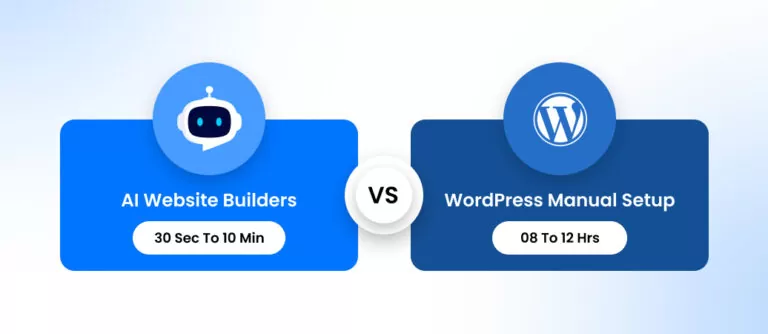
Speed is the strongest card in the AI builder’s hand. In controlled tests, AI tools can take a business from zero to a live website in under ten minutes.
Compare that to a traditional WordPress setup, which can involve:
- Manual theme research (2-3 hours)
- Plugin selection from 60,000+ options (2-3 hours)
- Content creation from scratch (6-8 hours)
- Configuration and testing (additional hours)
Industry data suggests AI website builders can be 5 to 8 times faster than traditional methods, with site generation taking as little as 30 seconds to 10 minutes compared to an average of 8 or more hours for manual setup. So, for a freelancer needing a portfolio by Friday, or a local business that has been procrastinating on its web presence for years, that speed is genuinely transformative.
AI builders also simplify the technical side considerably. You do not need to understand hosting, DNS, SSL certificates, or plugin conflicts. The learning curve that used to take weeks shrinks to roughly 15 minutes.
For simple use cases, including portfolios, landing pages, local service businesses, and startup MVPs, AI website builders deliver real value.
Where WordPress Wins: The Control Factor
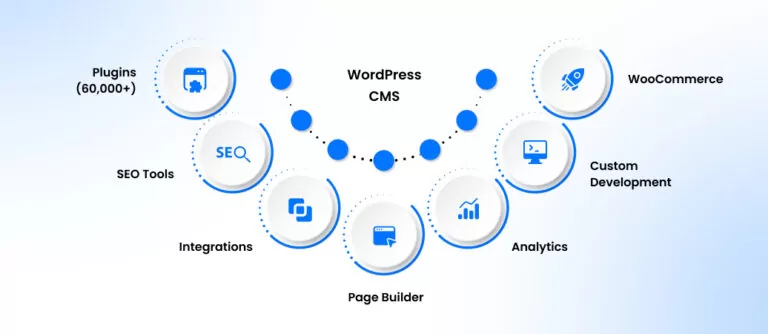
WordPress has earned its dominance over two decades for good reason. It is not the fastest platform to set up, but it is the most flexible platform to grow on. Here is where it pulls ahead:
Plugin Ecosystem
Content Structure and Scalability
WordPress allows you to build custom post types, custom taxonomies, and dynamic content relationships. This matters when your website grows from 5 pages to 500 pages. AI-built sites often have rigid, shallow structures that work for simple use cases but box you in as complexity increases.
SEO
Security and Longevity
WordPress is open-source with a massive security infrastructure, frequent core updates, vetted plugins, and a global developer community constantly patching vulnerabilities. Many standalone AI builders are still relatively young and relatively untested when it comes to long-term data privacy, compliance, and security.
Ownership and Portability
Side-by-Side Comparison: AI Website Builders vs. WordPress
Here is a clear breakdown across the factors that matter most for business decisions:
| Factor | AI Website Builders | WordPress |
|---|---|---|
| Setup Time | 30 minutes to a few hours | Several hours to days |
| Ease of Use | Very beginner-friendly | Moderate learning curve |
| Cost (Upfront) | Low to moderate (subscription-based) | Low (open-source, pay for hosting/theme) |
| Cost (Long-term) | Can get expensive as you scale | More cost-effective at scale |
| Customization | Limited to the platform's built-in options | Nearly unlimited in themes, plugins, and code |
| SEO Capabilities | Basic to moderate | Advanced, with tools like Yoast and Rank Math |
| Scalability | Suitable for simple, smaller sites | Built to scale in content and complexity |
| Plugin/Integration Options | Limited built-in integrations | 60,000+ plugins available |
| Content Management | Basic CMS features | Full-featured CMS from the ground up |
| eCommerce Support | Limited or platform-dependent | Robust via WooCommerce |
| Security | Managed by the platform (less control) | Established, with regular updates and vetted plugins |
| Site Ownership | Platform-dependent, risk of lock-in | Full ownership, portable, host anywhere |
| Support Community | Smaller, newer communities | Massive global community and documentation |
| Best For | Quick launches, simple sites, MVPs | Growing businesses, SEO-driven, content-heavy sites |
When Should You Choose an AI Website Builder?
AI website builders make the most sense when your primary goal is speed and simplicity, and your long-term needs are relatively straightforward.
Choose an AI builder if:
- You need a website to be live within hours, not days.
- You are building a simple portfolio, personal brand site, or local services page.
- You are validating a startup idea or testing a landing page concept before investing more.
- You have no technical background and no budget to hire developers.
- Your site will not need complex content structures, extensive integrations, or SEO-first growth.
When Should You Choose WordPress?
WordPress is the right choice when you are thinking beyond launch and thinking about growth.
Choose WordPress if:
- You are building a business website that will scale in content, traffic, and functionality.
- SEO and organic search are core parts of your digital marketing strategy.
- You are running or planning an online store (WooCommerce is best-in-class).
- You want full ownership and control over your site’s architecture and data.
- You need custom integrations, advanced plugins, or unique functionality.
- You are investing in a long-term digital presence that needs to adapt over time.
WordPress is a growth tool. It requires more upfront investment of time or budget, but that investment pays dividends as your business grows. The platform was built to handle complexity, and it does so without breaking.
The Real Choice Is Between Speed vs Control
The honest way to frame the AI website builder vs WordPress debate is not about which platform is better. It is about what your website needs to do for your business right now, and where you want it to be in two years.
If you need to launch fast and keep things simple, AI builders deliver. If you need to build, own, and grow a serious web presence, WordPress delivers.
And increasingly, the answer is not either-or. Many businesses start with an AI-assisted WordPress setup to get the speed of AI generation with the full power of WordPress underneath. Now, even WordPress offers an AI website builder that you can try for building a quick project that needs to go live in minutes or hours.
How to Get the Most Out of WordPress
1. Start with the Right Theme
2. Follow a Clear Build Process
A WordPress website setup does not have to be overwhelming. With the right approach, it is a straightforward process. For a step-by-step walkthrough, check out how to build a WordPress site in 11 easy steps.. It covers everything from domain setup to launching your first pages.
3. Use a WordPress Page Builder
A WordPress page builder like Elementor, Divi, or Beaver Builder gives you visual control over your site without requiring code. These tools let you drag, drop, and design exactly what you want. They are particularly powerful when paired with a well-structured theme.
4. Know When to Bring in Professionals
At a certain point, the complexity of a growing website warrants professional help. Whether you need custom functionality, site migration, performance optimization, or a full build from scratch, experienced developers make a significant difference. You can hire WordPress developers who specialize in building scalable, high-performance WordPress sites tailored to your business goals.
Conclusion
AI website builders are no longer just novelties. They are genuinely useful tools that have crossed a meaningful threshold in 2026. For the right use cases, they are fast, affordable, and effective.
But WordPress remains the platform of choice for businesses that are serious about long-term digital growth. With its unmatched flexibility, plugin ecosystem, SEO capabilities, and content management depth, it is hard to beat for anything beyond a simple launch.
The smartest approach is to ask the right question before making a choice: Are you building a website to get online fast, or are you building a website to build a business? If it is the latter, WordPress is worth the investment.
And if you want to build it right without doing it alone, a team of reliable WordPress experts can make all the difference.